Flink Series, Part 1: DataStream API
The fundamental building block of Flink — how to read, transform, and write streams using the DataStream API.
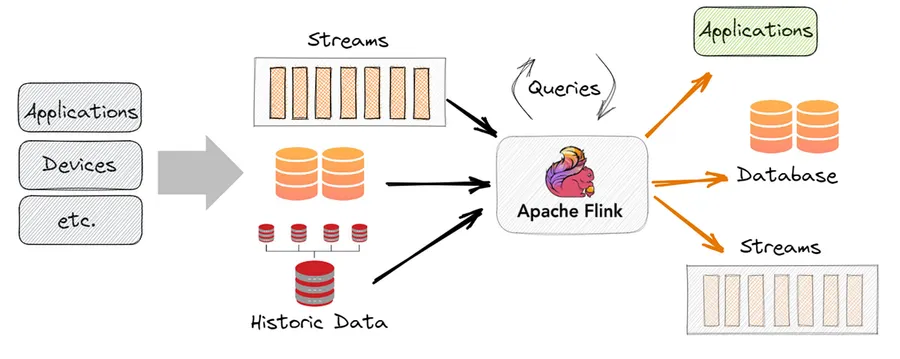
What Is the DataStream API?
The DataStream API is Flink’s core programming model. It represents a continuous, potentially unbounded sequence of data records that you can transform, filter, aggregate, and route. Think of it as the streaming equivalent of an RDD in Spark — the low-level, expressive foundation everything else is built on.
Unlike Spark’s micro-batch model, a Flink DataStream processes records as they arrive. There is no waiting for a batch to fill up.
Setting Up
from pyflink.datastream import StreamExecutionEnvironment
from pyflink.common.serialization import SimpleStringSchema
from pyflink.datastream.connectors.kafka import KafkaSource, KafkaOffsetsInitializer

env = StreamExecutionEnvironment.get_execution_environment()
env.set_parallelism(4)
The StreamExecutionEnvironment is the entry point for every Flink job. You configure parallelism, checkpointing, and state backends here before defining your topology.
Sources
A source reads data into Flink. Common sources:
Kafka source:
source = KafkaSource.builder() \
    .set_bootstrap_servers("kafka:9092") \
    .set_topics("events") \
    .set_group_id("flink-consumer") \
    .set_starting_offsets(KafkaOffsetsInitializer.earliest()) \
    .set_value_only_deserializer(SimpleStringSchema()) \
    .build()

stream = env.from_source(source, WatermarkStrategy.no_watermarks(), "Kafka Source")
File source (for bounded/batch):
stream = env.from_collection(["hello world", "flink rocks", "hello flink"])Socket source (for local testing):
stream = env.socket_text_stream("localhost", 9999)Core Transformations
Transformations are lazy — they define the computation graph but do not execute until you call env.execute().
map — transform each element one-to-one:
lengths = stream.map(lambda s: len(s))filter — keep elements matching a condition:
long_words = stream.filter(lambda s: len(s) > 5)flatMap — transform each element to zero or more elements:
words = stream.flat_map(lambda line, out: [out.collect(w) for w in line.split()])keyBy — partition the stream by a key. This is the gateway to stateful operations:
keyed = stream.key_by(lambda event: event["user_id"])After keyBy, each key’s records are guaranteed to go to the same operator instance. This enables stateful operations like counting per user.
reduce — aggregate within a key:
from pyflink.datastream import ReduceFunction

class SumReducer(ReduceFunction):
    def reduce(self, a, b):
        return a + b

counts = keyed.reduce(SumReducer())
Parallelism and Operator Chaining
Each operator in your topology can run with a different level of parallelism:
stream \
    .map(parse_event).set_parallelism(4) \
    .filter(is_valid).set_parallelism(4) \
    .key_by(lambda e: e["user_id"]) \
    .reduce(SumReducer()).set_parallelism(8)
Flink chains operators that can be fused without a network exchange — consecutive narrow transformations (map, filter, flatMap) run in the same thread, which reduces overhead. A shuffle (caused by keyBy, rebalance, or explicit partitioning) breaks the chain and requires a network transfer.
A Complete Example: Word Count Stream
from pyflink.datastream import StreamExecutionEnvironment
from pyflink.datastream.functions import FlatMapFunction, ReduceFunction

class Tokenizer(FlatMapFunction):
    def flat_map(self, value, collector):
        for word in value.lower().split():
            collector.collect((word, 1))

class Counter(ReduceFunction):
    def reduce(self, a, b):
        return (a[0], a[1] + b[1])

env = StreamExecutionEnvironment.get_execution_environment()

stream = env.socket_text_stream("localhost", 9999)

counts = stream \
    .flat_map(Tokenizer()) \
    .key_by(lambda x: x[0]) \
    .reduce(Counter())

counts.print()

env.execute("Streaming Word Count")
Run nc -lk 9999 in a terminal and type lines of text. Flink will emit running word counts as you type.
Sinks
A sink writes processed data out of Flink.
Print sink (debugging):
stream.print()Kafka sink:
from pyflink.datastream.connectors.kafka import KafkaSink, KafkaRecordSerializationSchema
from pyflink.datastream.connectors.kafka import DeliveryGuarantee

sink = KafkaSink.builder() \
    .set_bootstrap_servers("kafka:9092") \
    .set_record_serializer(
        KafkaRecordSerializationSchema.builder()
            .set_topic("output-topic")
            .set_value_serialization_schema(SimpleStringSchema())
            .build()
    ) \
    .set_delivery_guarantee(DeliveryGuarantee.AT_LEAST_ONCE) \
    .build()

stream.sink_to(sink)
Key Takeaways
StreamExecutionEnvironmentis your entry point; callenv.execute()to run the job- Sources feed data in; sinks write data out; transformations define what happens in between
keyBypartitions by key and enables stateful operations- Operator chaining fuses consecutive narrow transformations for efficiency
- The execution is lazy — the graph is built first, then optimized and executed
Next: Time & Windows